
MSP360 provides products to help protect your IT environment. MSP360 Backup provides backup and recovery for endpoints, servers, virtual workloads and SaaS data, with the flexibility to choose where backup data is stored. MSP360 RMM provides centralized monitoring, automation and remote management of endpoint environments, while MSP360 Connect enables secure remote access and support for users and devices.
MSP360 Backup provides flexible backup and recovery for endpoints, servers, databases, virtual workloads and SaaS data, giving organizations a practical way to protect critical systems across on-premises and cloud environments.
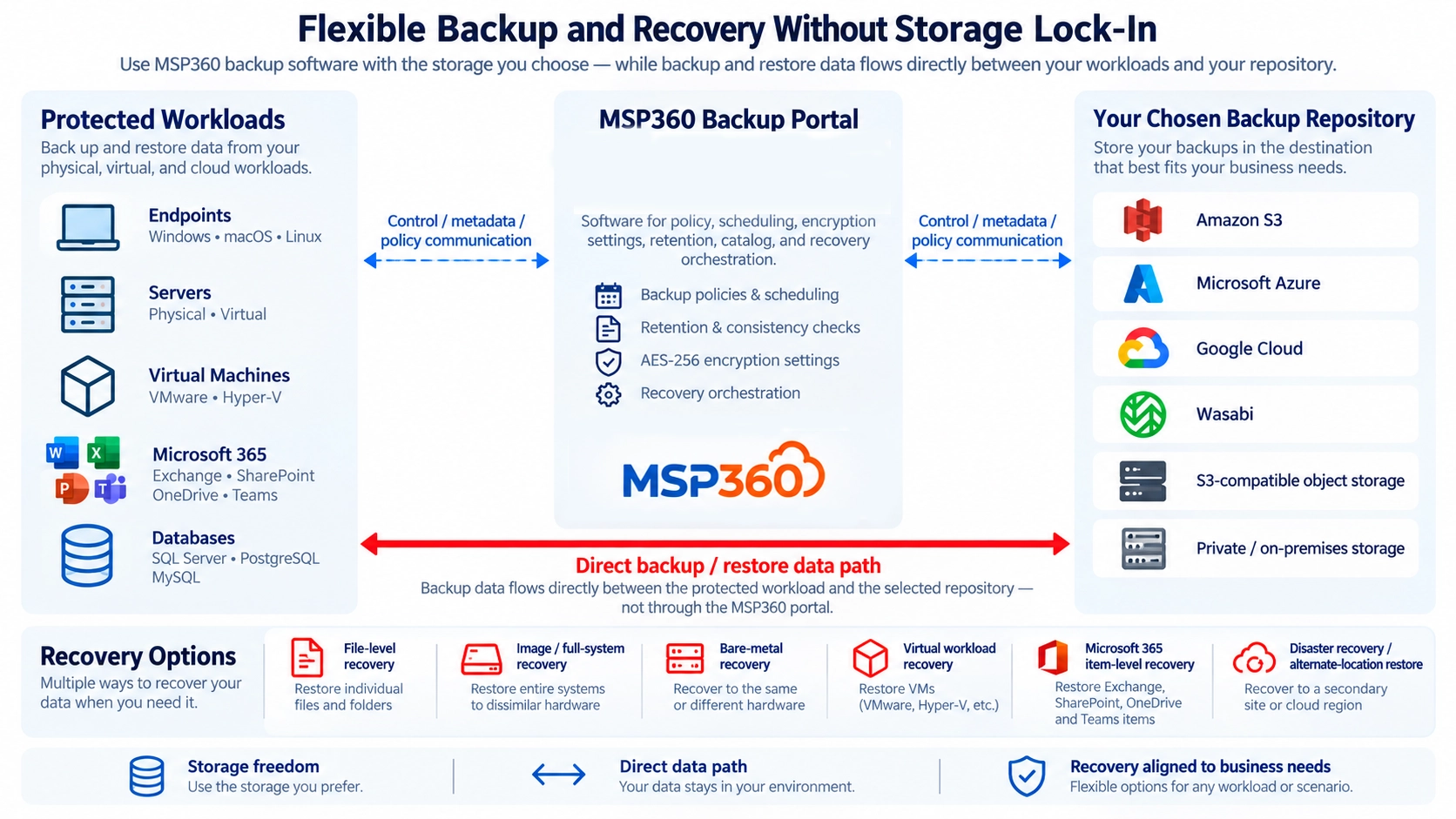
Unlike backup platforms that tie software and storage together, MSP360 allows organizations to retain control over where backup data is stored, supporting a more flexible approach to data protection and recovery.
Flexibility to max-and-match storage allows organizations to meet changing data sovereignty requirements as the backup/restore system can use any storage platform that meets an organizations data residency requirements
MSP360 Backup provides flexible protection across physical endpoints, servers and virtual workloads, allowing organizations to apply a consistent backup strategy across diverse IT environments.
Organizations can combine different backup methods and retention policies depending on the importance of each workload, providing more comprehensive protection without requiring the same recovery approach for every system.
Many backup platforms bundle software and storage into a single service, limiting where backup data can be kept and making future changes more difficult. In this scenario, the customer is locked-in to the storage vendor and cannot change their backup vendor without incurring significant expense. MSP360 takes a more flexible approach by allowing organizations to use the storage platform that best fits their technical, geographic and commercial requirements. The customer is not locked in to any storage vendor.
With MSP360, customers can choose to store their backup data on private storage or with any of the major cloud storage providers including Amazon S3, Microsoft Azure, Google Cloud, Wasabi and others. MSP360 only provides the backup software — the choice of which storage to use is up to the customer. Customers can even max-and-match storage vendors for different business requirements or as part of a maximum-resilience storage design.
Hararei can help organizations design and implement MSP360 backup solutions around practical recovery requirements, appropriate retention policies and their preferred cloud or private storage platform.
A successful backup job does not necessarily mean an organization is ready to recover. Effective data protection starts by defining what must be restored, how quickly it must be available and how much data loss the business can tolerate.
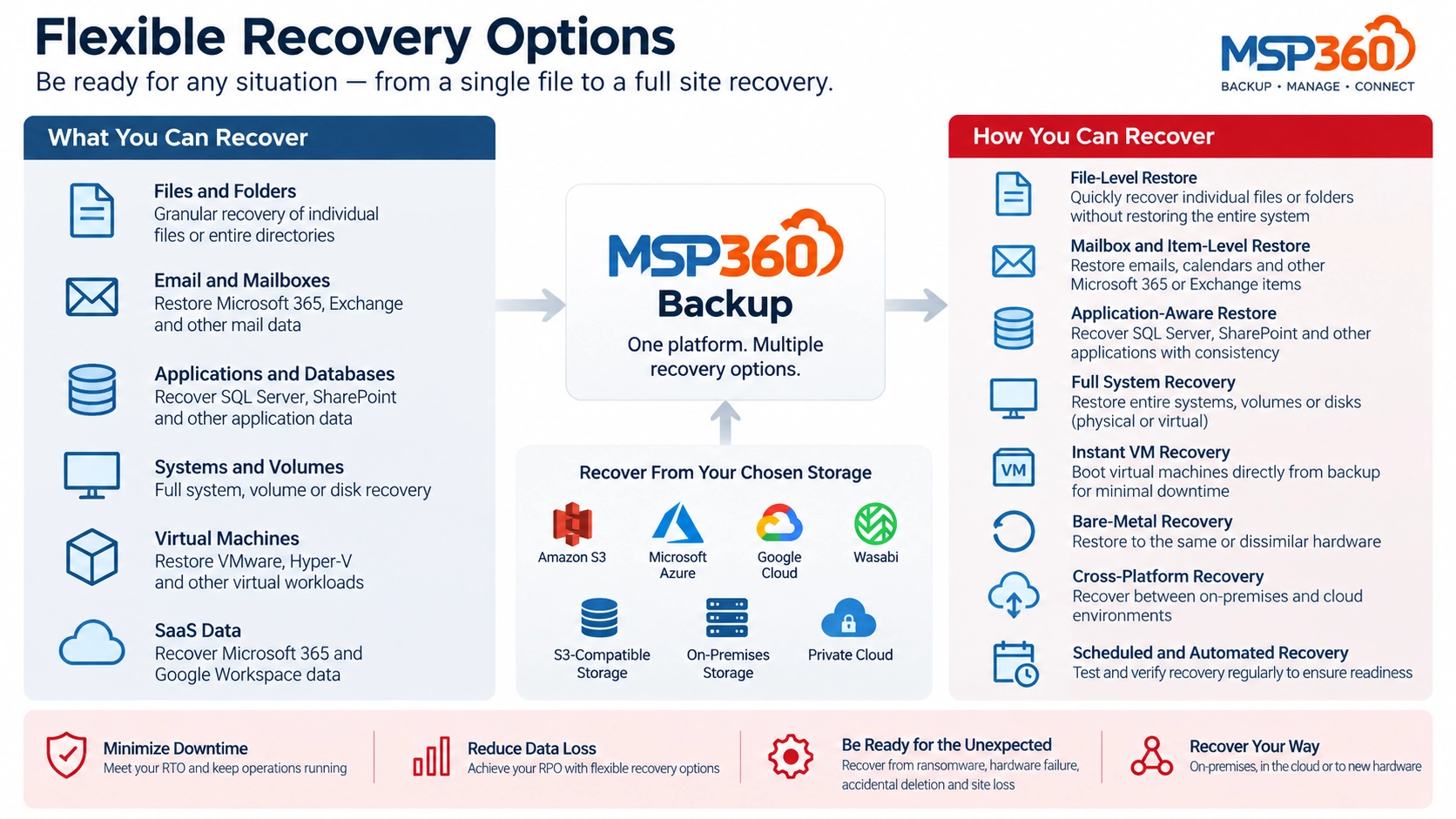
MSP360 enables organizations to build backup strategies around those recovery requirements, protecting against ransomware, accidental data deletion or corruption, hardware failure and other forms of data loss while supporting flexible retention and recovery options.
The objective is not simply to create more backup copies. It is to ensure critical data and systems can be restored when and where they are actually needed.
Protection strategies can be designed to meet any Recovery Point (RPO) and Recovery Time (RTO) objectives.
MSP360 Backup applies a consistent set of data-protection capabilities across a range of workloads, while allowing the backup method and recovery approach to be adapted to the system being protected. Common capabilities include scheduled backup plans, retention policies, encryption, backup consistency checks and centralized management.
Organizations can protect anything from individual files and folders to complete systems, virtual machines, databases and SaaS data. Backup data can be stored in the customer’s chosen cloud, private or on-premises repository, while recovery methods can be aligned with business RPO and RTO requirements.
Protect Windows, Linux and macOS systems using file-level or image-based backup depending on the recovery requirement.
Include critical Microsoft SQL Server workloads within centrally managed backup plans alongside the underlying server environment.
Protect database platforms that rely on their own application-consistent backup mechanisms using pre- and post-job processing.
Protect on-premises Microsoft Exchange as part of a broader application and infrastructure recovery strategy.
Protect VMware and Hyper-V virtual machines without requiring a separate backup agent inside every guest operating system.
Create an independent backup copy of Microsoft 365 data outside the production Microsoft environment.
Create an independent backup copy of Google Workspace data outside the production Google environment.
The appropriate recovery method depends on what has been lost and how quickly the workload must be returned to service.
Apply common protection policies while retaining control over where backup data is stored and how long it is retained.
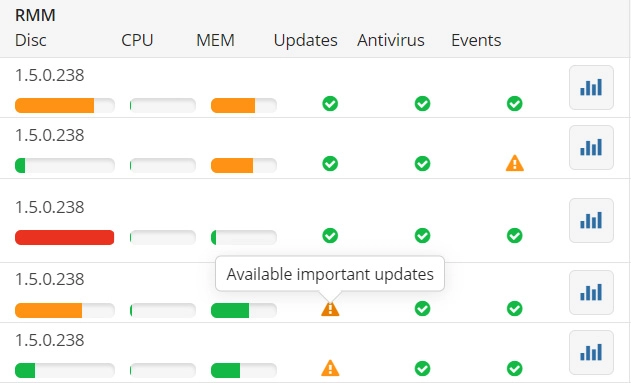
As endpoint environments become more distributed, IT teams need a practical way to monitor system health, identify problems quickly and manage devices without relying on local access. MSP360 RMM provides centralized visibility and remote management across endpoint environments from a single web-based console.
The platform combines computer health monitoring, alerting, patch management, scripting, scheduled tasks, remote commands and remote access capabilities. This allows IT teams to move away from purely reactive support and toward a more proactive operating model where routine administration can be automated and developing issues can be identified before they result in significant disruption.
For organizations supporting remote workers, branch offices or geographically distributed systems, MSP360 RMM can help reduce the operational effort required to maintain endpoint environments while improving consistency, visibility and control.
MSP360 Connect provides secure remote access to desktops and servers, allowing IT teams to support users, troubleshoot systems and perform administrative tasks without being physically present. It supports both attended and unattended access, making it suitable for help desk support, remote workforce management, branch offices and server administration.
Connections can be managed centrally through the MSP360 web console, with security controls such as multi-factor authentication, encrypted sessions, session recording and remote input controls helping organizations maintain visibility and control over remote support activity.
Let Hararei help you provide a solution for your endpoint management. Contact us for a no obligation consultation, or to arrange a product evaluation.
Contact Us Please contact Hararei for an in-depth discussion on using any of our Cloud or Cybersecurity products or services